
wcgw-safety-suite
WCGW Safety Suite: functional-safety engineering workflows (ISO 26262, IEC 61508, ISO 13849, ISO 14971, IEC 61800-5-2) over a traceability graph.
How to pay
Pick whichever fits your workflow — you can switch any time.
Subscribe
$5/month
Predictable monthly cost with included usage. Best for steady, high-volume traffic.
- Unlimited tools within plan limits
- One API key, billed once a month
- Cancel any time
Pay-per-call
$0.25 – $3 per call
Charge agents in USDC the moment they call a tool. No subscriptions, no signup — pay only for what you use.
- 4 priced tools available
- Settled in USDC on Base
- No account or API key required
WCGW Safety Suite is an AI-assisted safety engineering workspace for investigating what could go wrong in complex systems.
Engineers and AI agents work with a shared graph of hazards, constraints, requirements, relationships, and verification evidence. WCGW combines structured engineering knowledge, graph queries, and seven safety engineering methods to investigate failure scenarios, identify gaps, trace dependencies, examine common causes, and assess the consequences of changes.
Designed for safety-critical engineering across robotics, industrial automation, automotive, medical devices, and other complex systems, WCGW supports systematic investigation from early hazard analysis through verification and audit preparation.
AI-generated findings are proposals for human review, not approved safety requirements or evidence of compliance. WCGW does not certify systems or determine whether they are safe. It provides the tools to make engineering assumptions, dependencies, and safety arguments explicit, traceable, and open to scrutiny.
Make what could go wrong something you can investigate.
Tools
Prompts
How will you use wcgw-safety-suite?
In an AI agent
Claude, Codex, Cursor, VS Code… Choose →
From the terminal
mcpize CLI, pipelines, Skills. Choose →
In your code
TypeScript, Python, cURL. Choose →
How will you use wcgw-safety-suite?
In an AI agent
Claude, Codex, Cursor, VS Code… Choose →
From the terminal
mcpize CLI, pipelines, Skills. Choose →
In your code
TypeScript, Python, cURL. Choose →
Related MCP servers

Baseball
MCP server for retrieving baseball information
Pubmed
Production-ready PubMed Model Context Protocol (MCP) server that empowers AI agents and research tools with comprehensive access to PubMed's article database. Enables advanced, automated LLM workflows for searching, retrieving, analyzing, and visualizing biomedical and scientific literature via NCBI E-utilities.

CryptoWeather
MCP server for CryptoWeather Bitcoin price prediction AI providing real-time Bitcoin price prediction signals and trading recommendations.

HackMD
A Model Context Protocol server for integrating HackMD's note-taking platform with AI assistants.

NPM Sentinel
NPM Sentinel MCP - A powerful Model Context Protocol (MCP) server that revolutionizes NPM package analysis through AI. Built to integrate with Claude and Anthropic AI, it provides real-time intelligence on package security, dependencies, and performance.

Rabi MCP
Advanced MCP server specialized in Atomic, Molecular and Optical Physics
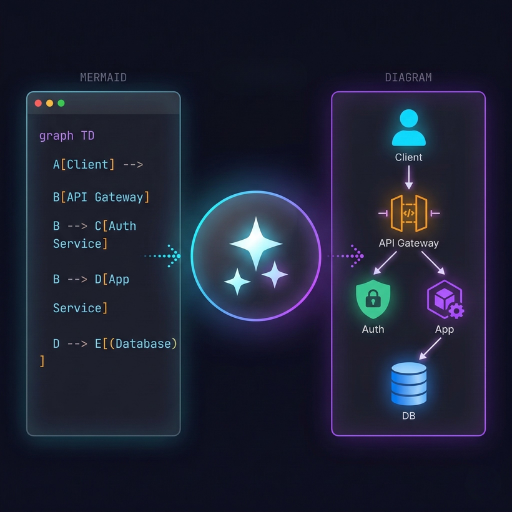
diagram-designer
Diagram Designer empowers software architects and DevOps engineers to convert Mermaid code into professional PNG architecture diagrams up to 2K resolution. Select from 5 styles (cloud, isometric, blueprint, whiteboard, darkmode), aspect ratios for presentations (16:9), docs (4:3), or social (1:1), plus AWS/GCP/Azure palettes and detail levels from overview (5-8 blocks) to full (15-25). Receive a secure download link (expires in 1 hour) via the generate_diagram_image tool in ~50-110 seconds.

LuminaRaptor28
LuminaRaptor28 AI agent orchestration MCP server with multi-agent pipelines, fan-out dispatch, RAG knowledge retrieval, and n8n workflow automation. 10 tools for building AI-powered business systems.